
« Back to Knowledge Base
The cost is automatically pro-rated to take this into account.


How to change the number of licenses on a vMix Max subscription
The number of licenses on a vMix Max subscription can be changed at any time by manually renewing the subscription.
This will extend the expiry date for all licenses on a subscription by an extra month each time.
The cost is automatically pro-rated to take this into account.
Example
1 January One vMix Max subscription started for $50 USD for one month, expiring 1 February
15 January Subscription renewed with an additional license added (2x total). Both licenses now expiring 1 March.
15 January Subscription renewed with an additional license added (2x total). Both licenses now expiring 1 March.
This renewal will be the cost of the new license for 1.5 months (from 15 January until 1 March, approx. $75 USD) plus the existing license for 1 additional month, for a total of $125 USD.
How to change a subscription
1. Login to the 2Checkout MyAccount page:
2. Click My Products in the top menu
3. Find the subscription in the list and click Renew now
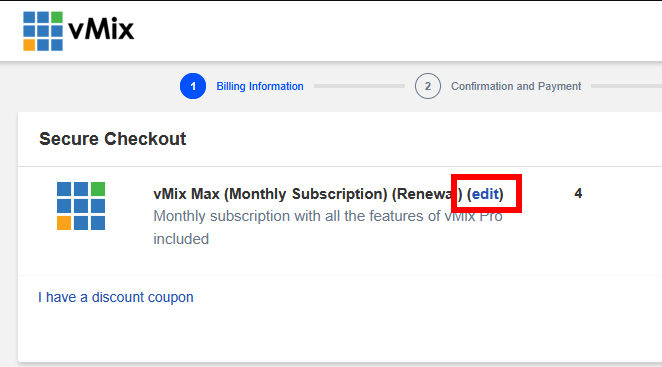
4. On the checkout page click Edit to change the quantity.
This can be changed to either increase and add further vMix Max subscription licenses. Or also to decrease and remove some of the vMix Max subscription licenses.
When increasing the quantity - it will automatically calculate a pro rata amount to be paid so that they all have the same expiry date going forward.
When decreasing the quantity - any remaining time left in the subscription being removed will be automatically applied pro-rata to the other vMix Max subscriptions that are remaining. Therefore there may be a smaller pro rata charge in order to line up the expiry dates again.
When decreasing the system automatically chooses the licenses to delete. Therefore you can either login to your vMix Account or 2Checkout Account to confirm which ones remain active.
Last Updated: Tuesday, February 10, 2026 1:25:57 PM